We’ve all been there: you’re mid-scroll or mid-game when the connection simply vanishes. Usually, it feels like a sudden snap—one second you’re online, the next you’re staring at a “No Internet” dinosaur. This happened to me and hundreds of other BeFibre customers last night.
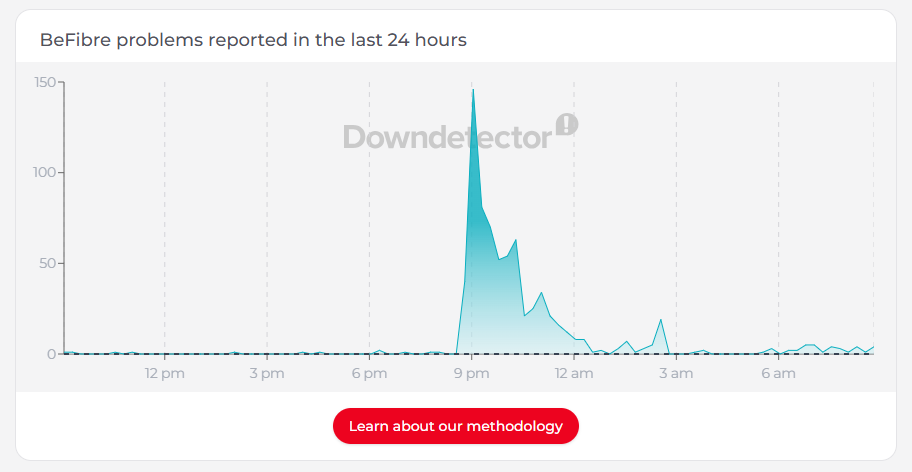
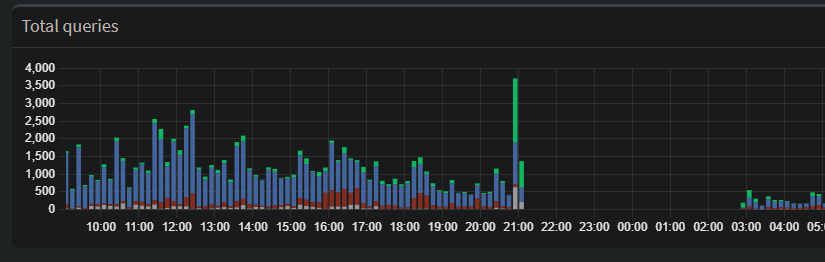
But last night, my network monitoring showed me something much more interesting. Before the lights went out on my ISP, my Pi-hole (a network-wide ad blocker and DNS sinkhole) captured a significant spike in traffic. It wasn’t a sudden surge in usage; it was the digital equivalent of my network devices “screaming” into a void.
The Network’s Digital “Death Throes”
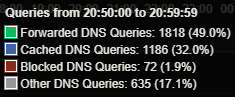
Looking at the dashboard data, you can see a large spike in forwarded DNS queries just before the total blackout. While it looks like my network was busier than ever, it was actually a textbook example of a Retry Storm.
Here is why this happens when an ISP begins to fail:
1. The Recursive Loop
When your ISP’s DNS servers start to lag or drop packets, your devices don’t just wait patiently. Modern operating systems are aggressive. If they don’t get a DNS resolution in a few milliseconds, they ask again. And again.
- The Spike: Every smart bulb, phone, and laptop on the network starts firing off duplicate requests, trying to find a path out to the internet.
2. The Cache Collapse
Usually, a Pi-hole is great because it caches common addresses locally, saving time and traffic. But DNS records have a “Time to Live” (TTL).
- As the ISP’s infrastructure flickered, my Pi-hole couldn’t refresh its cache.
- Once those local records expired, every single request—even for common sites—had to be “forwarded” upstream to a failing server. This is why the Forwarded (green) bar in the graph towers so high over the Cached (blue) bar.
3. Failover Hunting
Many “smart” devices are programmed with a plan B. When the primary connection gets spotty, they start “hunting”—switching between IPv4 and IPv6, or trying to hit hardcoded servers like Google’s 8.8.8.8. This creates a chaotic surge of DNS activity as the hardware desperately tries to “phone home.”
The Canary in the Coal Mine
Because this outage ended up being a widespread regional issue, this data is a perfect “canary in the coal mine.” It suggests that the ISP’s DNS or routing table didn’t just break; it became congested first.
Whether it was a massive DDoS attack or a major hardware failure at a regional hub, the network didn’t go quietly. It struggled, it retried, and it flooded the logs with requests before finally falling silent.
The Takeaway
If you use a Pi-hole or similar local DNS resolver, keep an eye on your Forwarded vs. Cached ratio. A massive spike in forwarded queries without a change in your actual browsing habits is often the first sign that your ISP is about to kick the bucket.
Have you ever caught a network failure in real-time? Check your logs—the data might be more dramatic than you think.