Archive for Recent Articles

PERFMON stops recording after 1 minute

Perfmon screenshot

As a performance tester, I’m used to collecting stats about Windows systems perrformance. I’ve done this using Windows PERFMON as well as using performance test tools such as LoadRunner and Facilita Forecast to gather performance related statistics from systems undergoing tests.

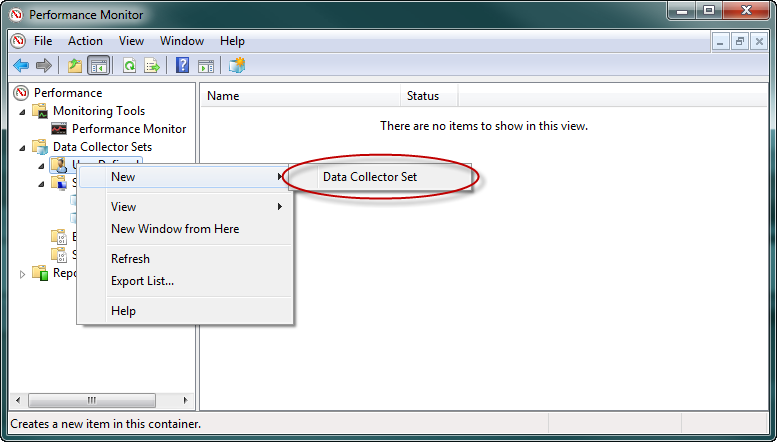
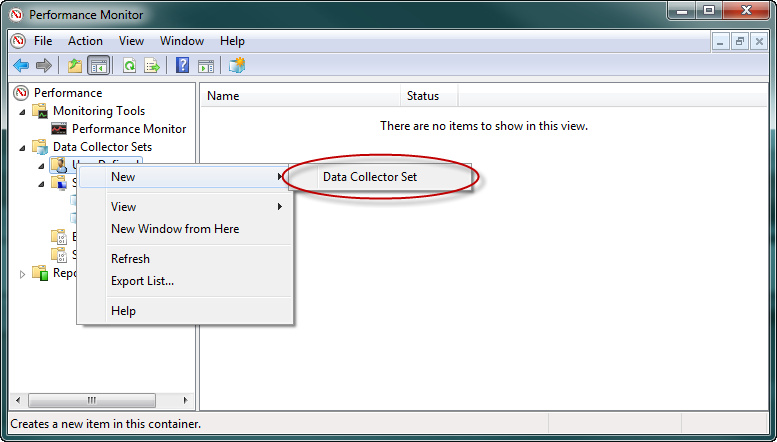
I recently did some performance testing for a client using Visual Studio and was gathering stats for later analysis. I used the Windows Performance Monitor snap-in to create my data collector sets as shown below.

Perfmon screenshot

By following the default options I found that my PERFMON counters were only gathered for one minute before stopping. I continually restarted my new data collector sets only to see them stop “as soon as my back was turned”. I check the account permissions for the running service, local security policies and event viewer logs but couldn’t find the problem.

When I was at the stage of tearing out my (rapidly thinning) hair, I came across this setting….

               By default, all windows performance counter data collector sets stop after 1 minute.

To alter this behaviour, “Right-click” on the properties for the new Data Collector Set.Perfmon Screenshot

Select the “Stop Condition” tab and uncheck the “Overall duration” checkbox.
By default this is set to 1 minute as shown below.

PERFMON screenshot

Interesting video describing performance test automation with Selenium

Shane Hender and Mark Watson : Automated Web Performance Testing before 5pm

Excellent video describing the use of Selenium for Automated Web Performance Testing

My recent research on cloud performance


Hi everyone,
I’ve been working on some research into the relative performance of various cloud offerings over recent weeks and I thought that it might be interesting to share my findings here. Last week my company published a whitepaper based on the research that I carried out over recent weeks comparing the relative performance of MS Azure, AWS and VMWare from a local IaaS provider. In each case we used the same two-tier application with the same test data and ran performance tests to see how each platform stood up to the load.
Surprisingly we ended up with results that showed that cloud could be both faster…and slower than physical hardware which seems to have caused some interest in the UK IT press.
http://www.businesscloudnews.com/infrastructure-as-a-service-/487-speed-of-cloud-no-issue-says-uk-specialists.html
http://forcearchitects.deliveredinnovation.com/2011/07/29/cloudup-7-29-2011/
http://www.v3.co.uk/v3-uk/news/2097905/cloud-beats-physical-infrastructure-configuration
http://www.thedatachain.com/news/2011/7/cloud_is_just_as_fast_as_conventional_hosting_environments
http://www.retailtechnology.co.uk/news/cloud-fast-and-more-reliable-retailers
http://www.microscope.co.uk/cloud-is-as-fast-as-physical-servers-report-claims/
If you’d like to see the whitepaper, you can get a copy from this URL.
http://intechnica.co.uk/Events/How-Fast-Is-The-Cloud
I’d be interested in any feedback that the members of this group might have on the research.
All the best
Richard

I’ve been working on some research into the relative performance of various cloud offerings over recent weeks and I thought that it might be interesting to share my findings here. Last week my company published a whitepaper based on the research that I carried out over recent weeks comparing the relative performance of MS Azure, AWS and VMWare from a local IaaS provider. In each case we used the same two-tier application with the same test data and ran performance tests to see how each platform stood up to the load.


The test application was nopCommerce which is a two-tier .NET application which uses a SQL back-end,

Surprisingly we ended up with results that showed that cloud could be both faster…and slower than physical hardware which seems to have caused some interest in the UK IT press.

Business Cloud News “Speed of cloud no issue, say UK specialists

Force Architests “Cloudup 29th July 2011

v3.co.uk “Cloud beats physical infrastructure if configuration is right

The data chain “Cloud is just as fast as conventional hosting environments

Retail Technology “Cloud: fast and more reliable for retailers?

Microscope “Cloud is as fast as physical servers report claims


If you’d like to see the whitepaper, you can get a copy from Intechnica.

I’d be interested in any feedback that any readers of these articles might have on the research.
 

A few tips on producing bulk test data

I recently had a requirement to run some performance tests against the nopCommerce open source eCommerce application. Whilst the default sample data was useful, if I really wanted to give the application a “work out”, I felt that I should create a large amount of test data.

I needed product descriptions, short descriptions and images for potentially thousands of products.
I considered taking content from other websites, but, conscious of the logal implications of doing this, I decided to produce my own data.

Images
To produce sample images, I took screenshots from the Intechnica company website and saved them as JPG files.
I then ran a batch file to make duplicate copies of each of these files.

e.g. To create 10 copies of a file called Image.jpg, use this command
for /l %i IN (1,1,10) DO COPY Image.jpg Image%i.jpg


Descriptions
To ensure that my test data was not always cached by the server, and was more representative of “real life” I needed to ensure that I used different descriptions for each product. This would ensure that my tests were production-like. I downloaded War and Peace from Project Gutenberg and used the UNIX “SPLIT” command to divide this text file into chunks. I chose 100 byte chunks for the short descriptions and 700 byte chunks for the long descriptions.

e.g. To split WarAndPeace.txt into 700 byte chunks, use this command. (SPLIT comes with CYGWIN)
split WarAndPeace.txt -b 700 -a 6 -d

This creates files called x000000, x000001, x000003 etc.
I needed to rename these to text files for simplicity so i used the DOS REN (rename) command to do this.

e.g. To rename all the new files in the folder
ren * *desc.txt


Using multiple Skype accounts simultaneously

Screenshot - creating Skype Shortcut

I recently started a new job and I was given a “company Skype account”. Whilst this was useful, I didn’t want to lose my own Skype account and I thought that it would be useful to keep them both. Then I started to wonder if it’s possible to be logged into both accounts at the same time. I had read about doing this by forwarding calls from one account to the other, but I wanted to try and use both at once.

I followed a few sets of instructions that I found on the Internet, but none seemed to work well, so after a little trial and error, I came up with this solution.
(Tested on two separate Windows 7, 64-bit PCs). 

  1. Find your Skype executable and copy the path to the .exe file.
    In my case this was “C:Program Files (x86)SkypePhoneSkype.exe”
  2. Create a new shortcut on your desktop by right-clicking the desktop and choosing New -> Shortcut.
    Paste in the path to your Skype executable.
    Screenshot - creating Skype Shortcut
  3. After clicking “Next” you’re prompted to give your shortcut a sensible name.
    I chose Skype (1)

  4. Repeat the above process but instead of using the path… 
    “C:Program Files (x86)SkypePhoneSkype.exe” 

    Use…
    “C:Program Files (x86)SkypePhoneSkype.exe” /secondary

  5. Give this second shortcut an appropriate name and you’re done.
    I chose Skype (2)
  6. Both executables then work independently of one another, the only thing that you need to do when opening Skype using the second shortcut is choose the account that you want to login with from the dropdown.
    Example of second instance of Skype

I hope that you find this tip useful.